AI Marketing Automation for Home Services: A Practical Booking System
Learn how home service businesses can connect local discovery, lead intake, estimates, follow-up, reviews, campaigns, and reporting in one governed AI workflow.
- Author: Sarah Chen
- Published: Aug 07, 2026
- Reading time: 20 min read
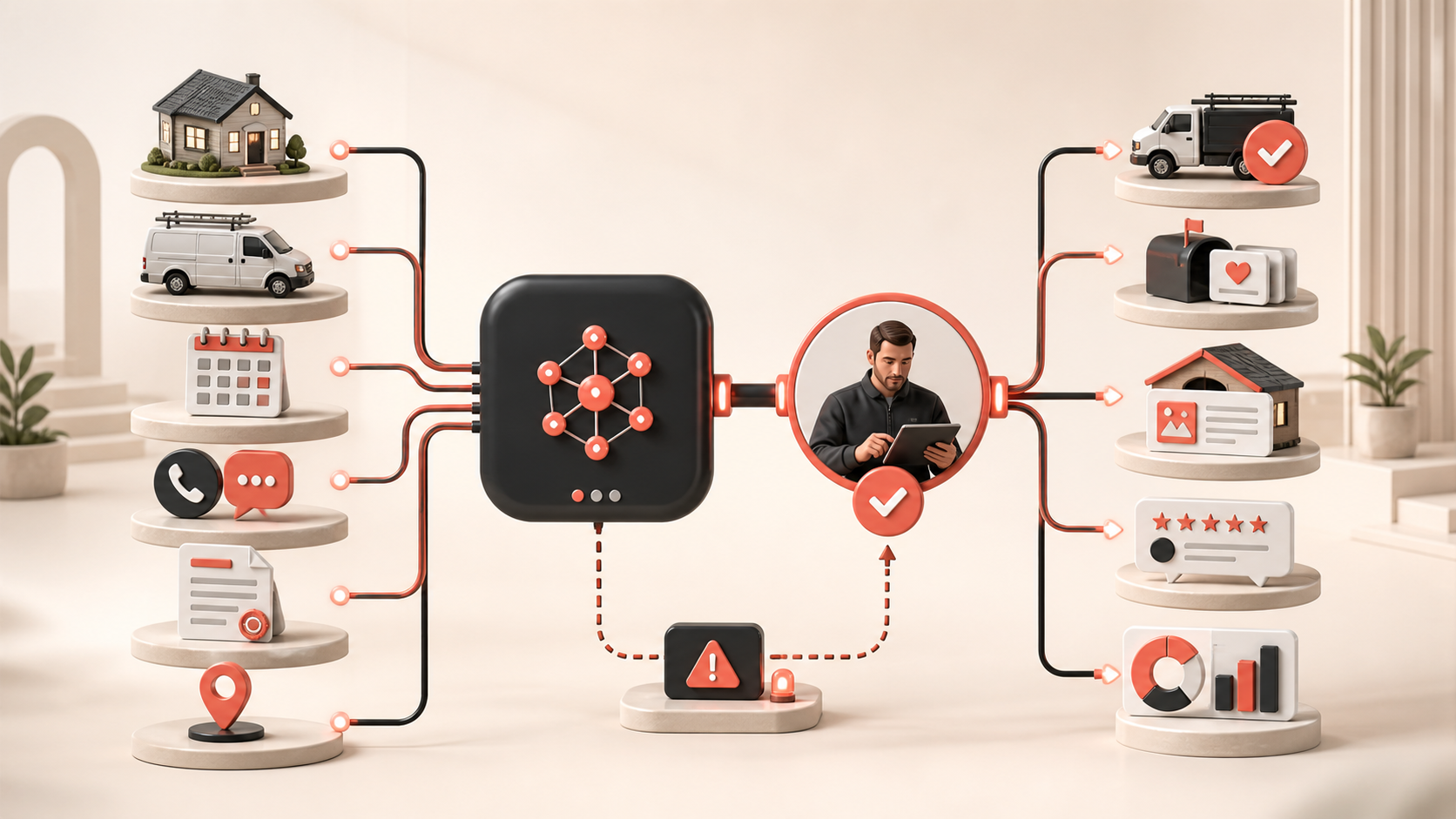
AI marketing automation for home services should help a contractor turn real customer demand into well-managed conversations and booked work. It should not invent service areas, send an unqualified technician, promise an arrival time the schedule cannot support, or chase a homeowner after they have opted out. The practical system connects local discovery, calls and forms, qualification, estimates, scheduling, follow-up, reviews, campaigns, and reporting while keeping a responsible person in control of customer promises.
That distinction matters for HVAC, plumbing, electrical, roofing, landscaping, cleaning, pest control, remodeling, and other field-service businesses. A lead may arrive after hours with an urgent problem, a photo, a preferred time, and an address just outside the service area. Marketing, office staff, dispatch, technicians, and finance all need the same facts. If each tool holds a different version of the customer or job, faster automation simply creates faster confusion.
This guide explains the complete operating model: which workflows are worth automating, what data they need, where human approval belongs, how to compare software, and how to test one bounded journey without promising guaranteed calls, rankings, jobs, or revenue.
What is AI marketing automation for home services?
AI marketing automation for home services is a coordinated workflow that uses approved business data, customer context, explicit rules, connected tools, generative AI, and human review to execute repeatable growth work. It can help classify an inquiry, draft a useful first response, prepare an estimate follow-up, create a seasonal campaign, suggest a review reply, or summarize channel performance. AI assists with retrieval, drafting, organization, and pattern finding; the business remains accountable for accuracy, permissions, availability, pricing, safety, and the action taken.
A simple autoresponder sends the same message after a form submission. A governed booking system first checks the service requested, location, channel permission, business hours, capacity, existing customer record, open job, and escalation rules. It knows when to create a task, when to offer an approved scheduling path, and when to stop and hand the conversation to a dispatcher. The commercial value comes from fewer dropped handoffs, not from producing the greatest number of messages.
A complete home services marketing system connects seven layers
- **Operating truth:** services, qualifications, service areas, hours, emergency rules, availability, price boundaries, financing terms, and approved claims.
- **Demand capture:** calls, messages, forms, ads, local profiles, referrals, website chat, and campaign responses.
- **Customer and job context:** identity, address, property or equipment notes, inquiry source, consent, estimate, appointment, job, invoice, and service history.
- **Decision rules:** fit, urgency, routing, ownership, timing, frequency, approval, suppression, and stop conditions.
- **Creation and delivery:** useful replies, website pages, local updates, email, social content, ads, estimate follow-up, and review requests.
- **Human control:** dispatch, technical judgment, quote approval, schedule confirmation, complaint handling, safety escalation, and exception recovery.
- **Evidence:** source record, generated version, editor, approver, send or publish result, customer response, booked job, correction, and outcome.
Why home service automation breaks at the handoffs
Most operators do not have a content shortage. They have a continuity problem. An ad platform knows which campaign produced a form. A call system holds the recording. A field-service platform owns the job. A spreadsheet tracks estimates. An email tool knows which messages were delivered. A local profile holds public hours and reviews. When those systems are not joined around a common customer and job record, the team cannot tell which promise was made, what changed, or what should happen next.
Start by defining a small set of states the whole workflow can understand: new inquiry, needs human triage, qualified, appointment requested, scheduled, estimate pending, estimate sent, won, lost, job complete, payment open, service issue, and suppressed. Each state should have an owner, allowed actions, required evidence, and exit condition. Keep marketing stages separate from dispatch and job statuses, but define the event that hands responsibility from one team to the next.
Eight high-value workflows to automate
1. Keep local service information accurate
Create an authoritative record for business name, phone, hours, emergency coverage, location type, service areas, services, qualifications, and destination links. Compare that record with the website, campaign pages, ads, directory entries, and local profile. Automation can flag mismatches and prepare corrections, but a named owner should approve changes that affect where the company operates or what it promises.
Google distinguishes service-area businesses from hybrid businesses and asks operators to represent their real-world location accurately. Its current Business Profile guide for service businesses explains those models, while its service-area guidance describes how areas should be configured. Treat that public information as controlled operating data, not keyword space.
2. Capture every inquiry with its source and permission
Normalize calls, forms, chat, messages, referrals, and campaign responses into one intake structure. Preserve the original source, timestamp, message, campaign context, contact permission, and any attached media. Deduplicate carefully: two people at one property may be different customers, while one person may use several channels for the same urgent problem.
A useful first response acknowledges the request, states what happens next, and asks only for the minimum information needed to route it. Avoid diagnosing dangerous conditions or committing to availability from a marketing system. Gas smells, electrical hazards, flooding, fire risk, injuries, threats, and other emergencies need an approved safety message and immediate human escalation rather than an AI sales sequence.
3. Qualify and route without pretending to be the technician
Use deterministic rules before generative interpretation. Check whether the address is served, the requested category is offered, the channel is permitted, and the business is open. AI can summarize free text, identify likely intent, and ask approved clarifying questions, but it should not make a technical diagnosis, quote outside approved boundaries, or decide that a safety concern is harmless.
Route the record to the right queue with a short evidence-backed summary: customer request, source, location, urgency signal, preferred timing, existing appointment, and missing fields. Show the original message beside the summary so staff can verify it. If confidence is low or records conflict, create a review task instead of silently choosing a path.
4. Follow up on estimates with context and stop rules
Estimate follow-up is a strong first automation because the trigger and business objective are clear. Build separate paths for an estimate awaiting internal approval, an estimate sent to the customer, a customer question, a revised scope, a declined estimate, and an accepted job. Messages should refer only to verified estimate details and give the recipient a direct path to a person.
Stop the sequence immediately when the customer replies, books, declines, opts out, disputes the scope, or opens a service complaint. Do not let marketing automation keep nudging someone while the office is resolving a price question or scheduling conflict. The email marketing workflow shows how approved journeys can be planned alongside content and review.
5. Turn one seasonal brief into approved local campaigns
Build a campaign brief around a real operational need: preseason maintenance, storm preparation, a service launch, a geographic expansion, or a schedule gap. Lock the facts first, including eligible services, locations, dates, capacity, offer terms, exclusions, qualifications, and landing page. AI can then prepare website copy, local updates, email, social variants, and ad concepts without changing the factual layer.
Connect content generation to the AI website builder, social media management, and ads management processes, but publish only after a reviewer checks licensing language, service availability, images, claims, geography, terms, tracking, and the destination experience.
6. Request honest reviews after real completed jobs
Use a verified job-complete event, not a predicted satisfaction score, to trigger a neutral request for honest feedback. Do not ask only customers the system thinks are happy, pressure someone to change criticism, write a review on a customer's behalf, or offer an incentive tied to a positive review. A complaint should enter service recovery without removing the customer's opportunity to share a genuine experience.
Google's official review guidance says reviews should reflect genuine experiences and prohibits incentives for posting, changing, or removing reviews. The Federal Trade Commission's reviews and testimonials rule Q&A gives businesses further context on deceptive review practices. Translate the rules that apply to your business into templates, permissions, monitoring, and staff training with qualified advice.
7. Draft helpful review replies and escalate sensitive cases
AI can categorize feedback, retrieve an approved response pattern, and draft a concise reply. It should never reveal an address, appointment, equipment, invoice, or service history in public. Safety allegations, injuries, property damage, discrimination, employee accusations, payment disputes, threats, legal demands, and privacy concerns need a private human process. Routine praise can receive a warm response, but even simple replies should avoid claims the record cannot support.
8. Connect marketing reports to appointments and completed work
Join campaign source, inquiry, qualified lead, appointment request, scheduled visit, estimate, booked job, completion, and revenue only where the identifiers are reliable. Show missing stages rather than guessing. AI can summarize patterns, spot unusual changes, and prepare questions, while managers interpret weather, seasonality, technician capacity, service mix, geography, repeat customers, cancellations, attribution gaps, and margin.
The analytics and reporting workflow can keep campaign actions and results in one workspace. The goal is to distinguish a lead-volume problem from an intake, scheduling, estimate, capacity, service, or measurement problem.
Give AI and people different jobs
| Workflow
| AI assistance
| Human responsibility
| Lead intake
| Normalize records, summarize requests, detect missing fields, and suggest an approved route.
| Confirm safety, service fit, urgency, ownership, and any customer promise.
| Campaigns
| Retrieve approved facts, draft channel variants, check required fields, and create review tasks.
| Approve claims, terms, geography, budget, timing, creative, and publication.
| Follow-up
| Select an allowed journey, prepare context, schedule approved steps, and detect stop events.
| Resolve questions, approve exceptions, protect permissions, and own the relationship.
| Reporting
| Join records, flag anomalies, summarize patterns, and surface missing evidence.
| Validate definitions, investigate causes, weigh capacity and margin, and choose the next test.
This division should be visible in software permissions, not just written in a policy. The NIST Generative AI Profile offers a voluntary risk-management reference for documenting roles, measuring behavior, monitoring systems, and managing generative AI risks. A small operator can apply the same practical idea without building an enterprise bureaucracy: name the owner, test the workflow, record the evidence, and make risky actions stoppable.
How to compare home services marketing automation software
Do not choose a platform from its chatbot demo or content gallery. Ask each vendor to run one real lead-to-booking scenario using imperfect data and score the complete operating path.
- **Field-service fit:** Does it connect the call, form, CRM, field-service management, scheduling, estimates, invoices, website, local profiles, email, social, ads, and analytics tools you actually use?
- **Source ownership:** Can you identify the authoritative system and freshness rule for services, areas, hours, qualifications, prices, offers, availability, and customer status?
- **Identity and job history:** Can it preserve people, properties, equipment, inquiries, jobs, estimates, permissions, and open issues without unsafe merges?
- **Grounded generation:** Can drafts be restricted to approved records and assets, with sources visible to reviewers?
- **Routing:** Can deterministic rules handle geography, service type, office hours, urgency, team ownership, and capacity before AI interpretation?
- **Approvals:** Can risk, claim type, price, spend, geography, audience, novelty, and uncertainty determine who reviews an action?
- **Stop conditions:** Can a reply, booking, decline, opt-out, dispute, cancellation, schedule change, safety concern, or integration failure pause every affected step?
- **Audit trail:** Can you recover the source, prompt or rule version, generated draft, editor, approver, destination response, customer reply, and correction?
- **Measurement:** Can it separate inquiries, qualified leads, appointment requests, scheduled jobs, estimates, wins, completions, and attributed revenue without hiding uncertainty?
- **Portability and control:** Can you export customers, permissions, suppression data, content, campaign history, job links, and logs, and revoke connected access?
A revealing demonstration includes five cases: a valid in-area maintenance inquiry, an address outside the service area, a possible safety emergency, an estimate recipient who replies with a question, and a booked customer who opts out of marketing. The platform should advance the first, route or decline the second according to policy, escalate the third, stop the fourth sequence for human response, and preserve the fifth customer's service communication while suppressing disallowed marketing.
Measure booking quality and operating reliability together
A useful scorecard tracks customer outcomes beside the mistakes and friction automation may introduce.
- **Local accuracy:** correct hours, service-area coverage, service detail completeness, broken links, and time to correction.
- **Intake health:** captured inquiries, duplicates, complete source data, routing accuracy, human response time, and missed handoffs.
- **Journey health:** delivery, replies, stops, complaints, opt-outs, duplicate messages, failed jobs, and recovery time.
- **Booking path:** qualified inquiries, appointment requests, scheduled visits, cancellations, no-shows, estimates sent, and estimates accepted.
- **Business outcomes:** completed jobs, service mix, repeat customers, acquisition cost, gross margin, and attributed revenue where definitions are reliable.
- **Control quality:** factual corrections, blocked unsafe actions, approval time, escalations, override rate, and unresolved exceptions.
Compare the pilot with the previous process and inspect losses by stage. More leads with fewer bookings may signal poor targeting or slow intake. More appointments with weak completion may reflect scheduling or qualification. Strong revenue with poor margin may reflect the wrong service mix. Automation earns trust when it helps the operator see those distinctions and act on them.
A 30-day pilot for one service and one area
Week 1: Map the customer journey
Choose one bounded workflow, such as maintenance estimate follow-up for one service area. Document the source systems, required fields, owners, permissions, response window, approved messages, booking path, suppression source, human handoff, failure route, and baseline measures. Write down exactly what the automation may and may not promise.
Week 2: Prepare data and edge cases
Clean the relevant service, area, schedule, customer, estimate, and consent records. Test synthetic examples for an out-of-area address, duplicate inquiry, closed office, expired estimate, existing appointment, customer reply, opt-out, safety signal, and unavailable integration. Confirm that tests cannot contact real customers or change the live schedule.
Week 3: Run in approval mode
Let AI retrieve, organize, draft, and validate, but require human approval for every customer-facing action. Label corrections by cause: source data, identity match, retrieval, generation, routing rule, permission, integration, or human decision. Fix repeatable system causes instead of accumulating vague prompt instructions.
Week 4: Automate one reversible step
Automate the lowest-risk step that performed reliably, such as creating an internal follow-up task, sending an already approved reminder within a narrow window, or stopping a sequence when a reply arrives. Keep sampling, logs, ownership, alerts, and a visible pause control. Add another service, area, or channel only after the team can explain and recover from failures.
Common questions about AI marketing automation for contractors
Does AI marketing automation replace field-service management software?
Usually not. Field-service software may remain authoritative for customers, jobs, technicians, schedules, estimates, and invoices. The AI operating layer connects that approved context to local discovery, websites, campaigns, messages, tasks, and reporting. The buying question is whether every important fact has an owner and every cross-system action can be seen, stopped, corrected, and exported.
Can AI answer calls and book jobs automatically?
It can assist with routine intake and approved scheduling in narrowly defined situations, but start with explicit boundaries. The system needs current service areas, hours, capacity, job types, safety escalation, identity handling, recording or consent requirements where applicable, and a reliable human transfer. It should never conceal uncertainty, improvise technical advice, or confirm a time the scheduling system has not reserved.
What should a home service business automate first?
Begin with internal visibility and reversible coordination: normalize inquiries, flag missing information, detect local-listing mismatches, assemble approved campaign drafts, create estimate follow-up tasks, and stop journeys when customers reply. Then automate one well-tested customer action with clear ownership and recovery.
How much data is needed?
Enough accurate operational data to make the chosen workflow safe and useful, not a giant warehouse. A small pilot may need only approved service and area records, a clean customer identifier, estimate status, contact permission, a few message templates, and reliable stop events. Data quality and ownership matter more than volume.
What is the biggest buying mistake?
Optimizing for immediate automated replies without testing the rest of the booking path. A system can respond quickly and still mishandle geography, duplicate customers, ignore an existing job, overpromise availability, lose the handoff to dispatch, or report a lead as a win. Evaluate continuity from source to completed work, including the awkward exceptions.
Connect home service demand to responsible action
Best AI CEO brings business context, websites, content, email, social publishing, advertising, analytics, customer records, and operational workflows into one workspace. Build a controlled path from a real inquiry to an approved next step, then keep your office and field teams responsible for every customer promise.
Explore the Best AI CEO platform, compare all features, see the workflow for small-business owners and marketing operations teams, read the broader AI marketing automation guide, browse more AI marketing and operations articles, or download Best AI CEO when you are ready to build the workflow.